
Product by Monarchy Infotech

Neonify: AI Photo & Video Editor Web App

Neonify is an all-in-one AI creative studio that runs in your browser. Remove backgrounds, clean up objects, add premium effects and export in HD or 4K, with no software to install.

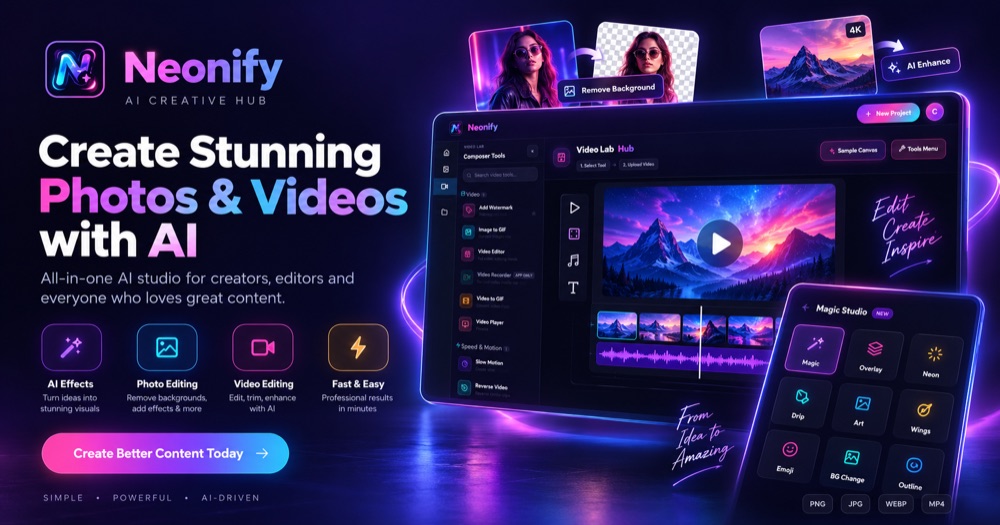
Neonify AI photo and video editor web app interface showing Video Lab, Magic Studio and background remover

What is Neonify?

Neonify is an AI-powered photo editor and video editor that works as a web app. It is built and owned by Monarchy Infotech, an IT company in Surat, Gujarat, India. Creators use Neonify to remove image backgrounds, erase unwanted objects, apply creative effects, enhance and upscale photos, and edit videos on a timeline, all from a single workspace on desktop, tablet or mobile.

Key Features

Everything you need to create better photos and videos with AI.

AI Background Remover

Cut out the subject from any photo in one click and get a clean transparent PNG, or swap in a new background.

Object Remover & Cleanup

Erase unwanted people, text or objects from a photo and let AI fill in the gap.

Magic Studio Effects

Apply premium effects such as Neon, Drip, Art, Wings, Emoji, Outline, Overlay and BG Change.

AI Enhance, Colorizer & Upscaler

Sharpen details, bring black and white photos to life and upscale images for high-resolution output.

Video Lab Timeline Editor

Trim and arrange clips on a timeline with adjustment controls, slow motion, reverse video and more.

HD & 4K Export

Export your work as PNG, JPG, WEBP or MP4, or convert between GIF and video.

Photo Lab & Video Lab Tools

Two creative workspaces in one app: edit images with AI in the Photo Lab and build videos in the Video Lab.

AI Photo Editor Tools

  • AI background remover with instant transparent PNG output
  • Object remover and photobomber / people removal with context-aware AI inpainting
  • AI photo enhancer with automatic de-blurring and noise reduction
  • 4x super-resolution upscaler for sharper, larger images
  • Photo colorizer and one-click restoration of old photos
  • Sky replacement with automatic sky and horizon detection
  • Cartoon and fine art style filters
  • Neon, drip, outline, overlay and wing effects in Magic Studio

AI Video Editor Tools

  • Multi-track timeline with import, trim and crop controls
  • Slow motion with AI frame generation for smooth results
  • Reverse video with an instant reverse engine
  • Video to GIF and image to GIF conversion
  • Add watermark to videos and images
  • Adjustment controls and effects for clips
  • Jitter-free playback while you edit
  • High-resolution video export as MP4

How Neonify Works

From upload to download in four simple steps.

1

Open your photo or video

Upload an image or video clip straight from your device. There is no software to install.

2

Pick an AI tool

Choose a tool such as Background Remover, Object Remover, AI Enhance, Magic Studio or the Video Lab timeline.

3

Let Neonify do the work

The AI engine runs in your browser, so you can preview the result, compare before and after, and fine-tune it.

4

Export and share

Download your finished work in HD or 4K as PNG, JPG, WEBP, GIF or MP4, ready for social media, websites or print.

What You Can Create with Neonify

A web-based AI photo and video editor for creators, businesses and everyday users.

Social Media Content

Create eye-catching posts, reels and stories with effects, cutouts and quick video edits.

Product & E-commerce Photos

Remove cluttered backgrounds and get clean, transparent product images for online stores.

YouTube Thumbnails & Videos

Cut out subjects, add neon outlines and trim clips to build thumbnails and short videos faster.

Old Photo Restoration

Colorize and restore faded family photos, then upscale them for printing or sharing.

Profile & Portrait Photos

Blur backgrounds, clean up blemishes and enhance portraits for a professional look.

Marketing & Ad Creatives

Produce banners, overlays and branded visuals with watermark and export tools for campaigns.

Why a Web App Instead of Desktop Software?

Neonify runs entirely in your browser using modern web technologies such as WebAssembly and WebGL, so there is nothing to download or update. Open it on a laptop, tablet or phone, pick up where you left off, and work from anywhere. The interface adapts from a full desktop workspace to a touch-friendly mobile layout, so you get the same AI tools on every screen.

Neonify at a Glance

ProductNeonify (AI Creative Hub)
TypeAI photo editor and AI video editor web app
PlatformWeb browser (desktop, tablet and mobile)
Export formatsPNG, JPG, WEBP, MP4 (HD and 4K)
Built byMonarchy Infotech, Surat, Gujarat, India
Websiteneonifyai.com

Who is it for?

  • Content creators and social media managers
  • Photographers who need quick retouching
  • Video editors making short-form clips
  • Small businesses creating product and marketing visuals

Built in Surat, Gujarat, India

Neonify is designed, developed and maintained by the in-house team at Monarchy Infotech, a software development company in Surat, Gujarat. The same engineers build custom web apps, mobile apps, AI-powered tools and SaaS platforms for startups and businesses in India, the USA, Canada and other markets worldwide.

Looking for an AI app development company in Surat or elsewhere in India? Neonify shows what we can build: a complete AI product, from idea and UI/UX to a production web app. Explore our SaaS development, AI development, web development and mobile app development services, or contact us for a free consultation.

Neonify - FAQ

Common questions about Neonify, our AI photo and video editor, answered.

Neonify is an all-in-one AI photo editor and AI video editor that runs in your web browser. It combines a background remover, object cleanup, premium effects and a video timeline editor in one workspace.
Neonify is built and owned by Monarchy Infotech, an IT company based in Surat, Gujarat, India.
No. Neonify is a web app, so you can use it directly in a modern browser such as Chrome, Edge, Safari or Firefox on desktop, tablet or mobile.
You can remove backgrounds, clean up unwanted objects, apply creative effects, colorize and enhance photos, and export the result in HD or 4K as PNG, JPG or WEBP.
Yes. The Video Lab offers a timeline editor with trimming, speed and motion tools, reverse video, GIF conversion and MP4 export.
Open your photo, choose Background Remover, and Neonify's AI detects the subject and cuts it out automatically. You get a transparent PNG you can place on any background.
Yes. The Object Remover lets you brush over an unwanted object, person or text, and context-aware AI inpainting fills the area to match the surroundings.
Yes. The AI upscaler offers super-resolution scaling, up to 4x, to make small or blurry images sharper and larger without obvious artifacts.
You can export images as PNG, JPG and WEBP, create animated GIFs, and export videos as MP4 in HD or 4K quality.
Yes. Neonify is designed and developed by Monarchy Infotech in Surat, Gujarat, India, and is available to creators worldwide through the web.
Yes. Our team in Surat, Gujarat builds custom web and mobile applications for clients across India and worldwide. Contact us for a free consultation.

Ready to Create?

Try Neonify today, or talk to us about building your own product.

WhatsApp Support
WhatsApp Support ×
× WhatsApp QR code